









Infinity Casino Login
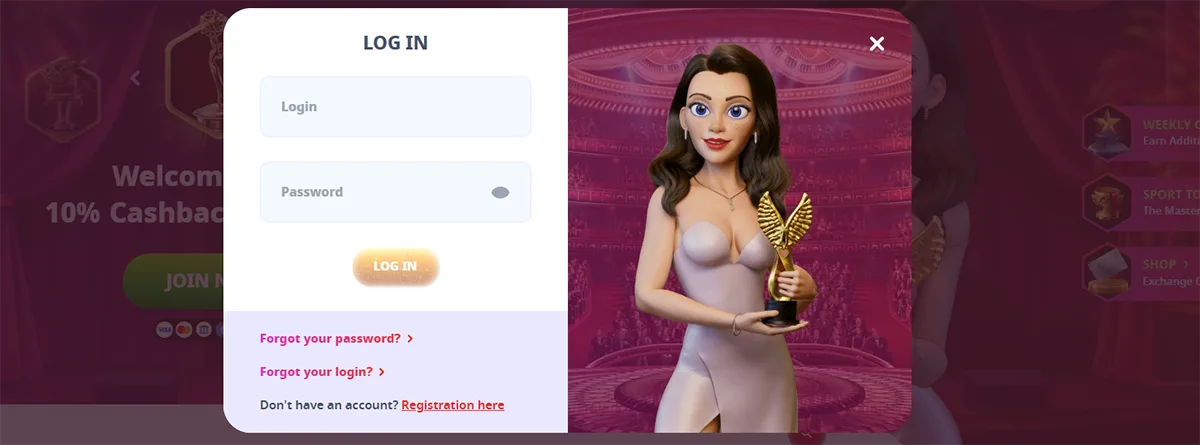
Infinity Casino provides players with a secure login system that grants access to thousands of slot games, live dealer tables, and sports betting options. The platform has recently relaunched with enhanced security features and a streamlined authentication process designed for both new and experienced players.
The Infinity Casino login process is straightforward and prioritizes user security while ensuring seamless access to your gaming account. Once logged in, players can access their account dashboard, claim bonuses, manage deposits and withdrawals, and enjoy the full range of casino games available on the platform.
We'll guide you through the complete login process, from initial account setup to troubleshooting common access issues. You'll also learn about the security measures in place to protect your account and how to maximize your gaming experience through the mobile platform.
How to Access Infinity Casino Login
Accessing your Infinity Casino account requires following specific steps through supported devices and compatible browsers. The platform maintains security protocols while ensuring seamless entry across multiple platforms.
Step-by-Step Login Process
We begin by navigating to the official Infinity Casino website or opening the mobile application. The login button appears prominently in the upper right corner of the homepage.
Required Information:
- Registered email address or username
- Account password
- Two-factor authentication code (if enabled)
Click the login button and enter your credentials in the designated fields. Ensure your email address matches exactly what you used during registration. Enter your password carefully, as the system is case-sensitive.
If you encounter login difficulties, we recommend checking your internet connection first. Clear your browser cache and cookies if the page doesn't load properly. The "Forgot Password" link provides immediate access to password recovery options.
After successful authentication, the system redirects you to your account dashboard. Your balance, recent games, and available promotions display immediately upon entry.
Supported Devices for Logging In
We support login access across iOS and Android devices through dedicated mobile applications. The Casino Infinity app maintains full functionality including deposits, game access, and account management features.
Desktop Access:
- Windows PCs
- Mac computers
- Linux systems
Mobile Devices:
- iPhones (iOS 12 and later)
- Android phones (Android 8.0 and later)
- iPads and Android tablets
The mobile application preserves identical graphics and user interface elements found on desktop versions. We ensure consistent performance whether you access your account through smartphone, tablet, or computer.
Cross-device synchronization means your account data remains current regardless of which device you use for login. Game progress, balance updates, and bonus status sync automatically across all platforms.
Browser Compatibility
We optimize our platform for major web browsers to ensure reliable login access. Chrome, Firefox, Safari, and Edge provide the best user experience with our security systems.
Recommended Browsers:
- Google Chrome (version 90+)
- Mozilla Firefox (version 88+)
- Safari (version 14+)
- Microsoft Edge (version 90+)
Enable JavaScript and cookies in your browser settings for proper functionality. We require these features for secure authentication and session management. Disable ad blockers temporarily if login pages fail to load completely.
Older browser versions may experience compatibility issues with our security protocols. We recommend updating to the latest browser version before attempting login. Mobile browsers follow the same compatibility requirements as their desktop counterparts.
Account Registration Requirements
Creating a Casino Infinity account requires meeting specific eligibility standards, providing accurate personal details, and completing identity verification steps. The registration process takes approximately 5 minutes and involves three main phases.
Eligibility Criteria
Casino Infinity restricts access to players who meet legal gambling age requirements in their jurisdiction. We must be at least 18 years old in most regions, though some areas require players to be 19 or 21 years old.
Geographic restrictions apply to certain countries and territories. Casino Infinity operates under specific licensing agreements that determine which regions can access the platform. Players from restricted jurisdictions cannot create accounts or access games.
Account holders must provide legitimate contact information during registration. We cannot use temporary email addresses or fake phone numbers, as these will fail during the verification process.
Personal Information Needed
The registration form requires several categories of personal data to establish our account. We must provide our full legal name exactly as it appears on government-issued identification documents.
Contact details include a valid email address and phone number. Casino Infinity uses these for account notifications, security alerts, and verification codes.
Required information includes:
- Date of birth
- Residential address with postal code
- Preferred currency (CAD for Canadian players)
- Username and secure password
We must ensure all information matches our official documents. Discrepancies between registration data and verification documents will delay account approval or result in account suspension.
Verification Process
Account verification begins immediately after registration through email or phone confirmation. We receive a verification code that must be entered within the specified timeframe to activate basic account functions.
Document verification requires submitting government-issued photo identification. Acceptable documents include passports, driver's licenses, or national ID cards. The documentation must be current and clearly show our name, photo, and date of birth.
Address verification involves providing a recent utility bill, bank statement, or government correspondence dated within the last 90 days. The document must display our name and registered address clearly.
Casino Infinity typically processes verification requests within 24-72 hours. We cannot make withdrawals or access certain features until verification is complete. The platform may request additional documentation if initial submissions are unclear or insufficient.
Password Recovery and Account Security
Infinity Casino provides multiple layers of protection for your account, including streamlined password recovery processes and advanced security features. These systems work together to keep your gaming experience secure while ensuring easy access when you need it.
Resetting Your Password
If you forget your password, the recovery process takes just a few minutes to complete. Navigate to the login page and click the "Forgot Password" link below the password field.
Enter your registered email address in the recovery form. We'll send a password reset link to your inbox within 2-3 minutes. Check your spam folder if the email doesn't appear in your main inbox.
Click the reset link in the email to access the password creation page. Your new password must contain:
- At least 8 characters
- One uppercase letter
- One number or special character
The reset link expires after 24 hours for security purposes. If it expires, simply request another reset email through the same process.
Two-Factor Authentication Options
We offer multiple two-factor authentication methods to add an extra security layer to your account. SMS verification sends a 6-digit code to your registered phone number each time you log in from a new device.
Authenticator apps like Google Authenticator or Authy provide more secure verification. These apps generate time-based codes that refresh every 30 seconds, making unauthorized access nearly impossible.
Email verification serves as a backup option when other methods aren't available. This method sends a confirmation code to your registered email address during login attempts.
Enable 2FA in your account settings:
- Go to Security Settings
- Select your preferred method
- Follow the setup instructions
- Test the authentication process
Protecting Your Login Credentials
Never share your login information with anyone, including customer support representatives. We'll never ask for your password through email, phone, or chat support.
Use a unique password for your Infinity Casino account that differs from other online accounts. Password managers help generate and store complex passwords securely across all your accounts.
Log out completely when using shared computers or public Wi-Fi networks. Always verify you're on the official Infinity Casino website by checking the URL and security certificate before entering credentials.
Monitor your account regularly for unusual activity. Report any suspicious login attempts or unauthorized transactions to our security team immediately through the help center.
Troubleshooting Login Issues
Login problems at Infinity Casino typically stem from forgotten credentials, account security measures, or technical connectivity issues. These issues can be resolved through systematic troubleshooting steps and proper security practices.
Forgotten Username or Password
We recommend starting with the password reset function when you cannot remember your login credentials. Click the "Forgot Password" link on the login page and enter your registered email address.
Check your email inbox within 5-10 minutes for the reset instructions. The email may arrive in your spam or junk folder, so we suggest checking these locations if you don't see it immediately.
Password Reset Steps:
- Click "Forgot Password" on the login page
- Enter your registered email address
- Check your email for reset instructions
- Create a new password following security requirements
- Log in with your new credentials
If you've forgotten your username, contact customer support with your email address and account verification details. We keep records of usernames associated with verified email addresses.
Account Lockouts and Suspensions
Account lockouts occur after multiple failed login attempts as a security measure. We typically implement a temporary lockout period ranging from 15 minutes to several hours.
Wait for the lockout period to expire before attempting to log in again. Repeated failed attempts will extend the lockout duration automatically.
Common Lockout Causes:
- Multiple failed password attempts - Usually 3-5 incorrect tries
- Suspicious login activity - Logins from new devices or locations
- Security verification requirements - Additional identity confirmation needed
Account suspensions require direct contact with our support team. These occur due to verification issues, security concerns, or policy violations. We cannot lift suspensions through automated systems.
Resolving Connectivity Problems
Clear your browser cache and cookies if you experience loading issues or error messages. We recommend using an incognito or private browsing window to test if the problem persists.
Check your internet connection stability and try switching between Wi-Fi and mobile data. Server maintenance occasionally affects login access, so we advise checking our official website for maintenance announcements.
Technical Solutions:
- Clear browser cache and cookies
- Disable browser extensions temporarily
- Try a different web browser
- Restart your router or modem
- Update your browser to the latest version
Contact our technical support team if these steps don't resolve the issue. We provide multiple contact methods including live chat, email, and phone support for persistent technical problems.
Mobile Login Experience
Casino Infinity provides mobile access through both a dedicated app and mobile browsers. The platform ensures secure authentication and fast access across different mobile devices.
Using the Infinity Casino App
The Casino Infinity app offers the most streamlined mobile login experience. We can download the app directly from the official website or app stores for instant access to our accounts.
Key app features include:
- One-touch login after initial setup
- Biometric authentication support
- Automatic session management
- Push notification alerts
The app stores our login credentials securely after the first successful sign-in. This eliminates the need to enter usernames and passwords repeatedly. We simply open the app and tap the login button.
Setup steps:
- Download the Casino Infinity app
- Enter login credentials on first use
- Enable biometric authentication if desired
- Allow push notifications for account updates
The app maintains our session longer than browser versions. This reduces login frequency during regular gaming sessions.
Mobile Browser Login Instructions
Mobile browser login works through any standard web browser on smartphones or tablets. We access the same login portal used on desktop computers.
Browser login process:
- Navigate to the official Casino Infinity website
- Tap the "Login" button in the top menu
- Enter username and password
- Complete any required verification steps
Mobile browsers require manual credential entry each time unless we enable password saving. The login page automatically adjusts to fit mobile screens without horizontal scrolling.
Browser compatibility:
- Safari (iOS)
- Chrome (Android/iOS)
- Firefox (Android/iOS)
- Edge (Android/iOS)
We recommend using updated browser versions for optimal security and performance. The mobile site maintains full functionality including account management and gaming features.
Benefits of Infinity Casino Account Login
Creating and accessing your Infinity Casino account unlocks exclusive promotional offers and provides a customized gaming interface tailored to your preferences.
Access to Exclusive Offers
Logging into your Infinity Casino account grants access to member-only promotions that aren't available to guest users. We've found that registered players receive personalized bonus offers based on their gaming history and deposit patterns.
Welcome bonuses for new account holders include up to C$750 plus 200 free spins. Weekend reload bonuses offer existing players C$1,050 plus 50 free spins when depositing C$30 or C$75.
The VIP program provides additional benefits for frequent players. Higher-tier members receive faster withdrawal processing, dedicated customer support, and exclusive tournament invitations.
Account holders also receive:
- Daily login bonuses and free spin rewards
- Birthday bonuses and anniversary promotions
- Cashback offers on losses during specified periods
- Early access to new game releases
Personalized Dashboard Features
Your logged-in dashboard displays a customized gaming interface that adapts to your playing preferences. We can track your favorite games, recent activity, and preferred payment methods for quicker access.
The transaction history section provides detailed records of deposits, withdrawals, and bonus usage. This feature helps monitor your gaming budget and track bonus wagering requirements.
Game recommendations appear based on your playing history. The system suggests new slots or table games similar to ones you've enjoyed previously.
Your dashboard also includes:
- Quick deposit buttons with saved payment methods
- Bonus progress tracking with wagering requirement counters
- Support chat history for easy reference to previous conversations
- Responsible gaming tools including deposit limits and session timers
Safety and Privacy Measures
Infinity Casino implements advanced encryption technologies and comprehensive privacy policies to protect user data and maintain secure gaming environments. The platform prioritizes player safety through multiple security layers and transparent data handling practices.
Data Encryption Standards
Infinity Casino utilizes advanced encryption technologies to safeguard personal and financial information during the login process and all subsequent transactions. The platform employs industry-standard SSL encryption protocols that protect data transmission between users' devices and casino servers.
All sensitive information, including login credentials and payment details, undergoes encryption before storage in secure databases. This encryption ensures that even if data breaches occur, the information remains unreadable and unusable to unauthorized parties.
The casino's security infrastructure includes multiple authentication layers that verify user identity during login attempts. These measures prevent unauthorized access to player accounts while maintaining smooth login experiences for legitimate users.
User Privacy Policies
We maintain detailed privacy policies that outline how Infinity Casino collects, processes, and protects user data. The platform's privacy framework covers data collection practices, storage duration, and third-party sharing limitations.
Players receive transparent information about what personal data the casino requires during registration and login processes. The privacy policy specifies that data collection focuses on essential gaming operations and regulatory compliance requirements.
Infinity Casino provides users with control over their personal information through account management tools. Players can request data modifications, access their stored information, and exercise deletion rights in accordance with applicable privacy regulations.